Followers

Wednesday, November 9, 2011

Term Quote Sheet

Need a few quick term quotes, but don't have the time to run a separate illustration for each?  No problem!  Simply use the Term Quote Sheet wizard on ikclife!  The Term Quote Sheet will allow you to quote up to six term policies at once and will display the premium information for each policy type side-by-side, all on one page!


To use this wizard, navigate to www.ikclife.com and log in.  Once you have logged in, click on Agent Home, click on Wizards, and select the Term Quote Sheet concept.


When the user interface displays, simply type in the necessary information and click Run Wizard when finished.


Output will be generated which will display premiums based on the client information you entered, mode you selected, and products you chose from the dropdowns.


Illustration Development Team

Wednesday, November 2, 2011

Managing Alerts

iKCLife gives you the ability to manage changes made to your clients' policies.
To access Alerts, simply log in to www.ikclife.com, click on Agent Home, and select the Alerts tab.


Your Alerts will be displayed and policy changes that have taken place in the last sixty days for policies assigned to your agent number(s) will be populated.  Click on a category to view detailed information, including policy numbers related to each type of change.


Illustration Development Team
illustrationhelp@kclife.com

Wednesday, October 26, 2011

Letters to Policyholders

In mid-October, letters were sent to policyholders in accordance with the Gramm-Leach-Bliley Privacy Act.  To view a list of your policyholders that received a letter, simply navigate to www.ikclife.com.

Once you have logged in, click on "Agent Home" and select "Alerts."  To view the list of policyholders that received a letter, simply click on the letter types highlighted below and the information will be displayed.


Illustration Development Team

Tuesday, October 18, 2011

Income Assured Option Fact Finder

iKCLife has a new and exciting Income Assured Option Fact Finder!

To access the Income Assured Option Fact Finder, log in to www.ikclife.com.  If you don't have a login, you can create one by navigating to www.ikclife.com and clicking on the icon highlighted below:


After you have logged in, navigate to "Agent Home," click on the "Wizards" tab, and select the "IAO Fact Finder."


Once the IAO Fact Finder is displayed, fill in the appropriate information to determine Survivor Income Needs at Death.  If you have a question on what any of the fields mean or how an amount is calculated, simply take your cursor and place it over the question mark next to the field and a description will be displayed.  Once you have filled in all of the appropriate information, click "Next."


Next, fill out the appropriate values for the Survivor Cash Needs at Death.  Make sure to include any existing life insurance at the bottom.  Once you are satisfied with your inputs, click "Next."


Information based on your inputs will then be displayed on the page.  This will sum the Survivor Income Needs at Death and the Survivor Cash Needs at Death minus any existing life insurance to give a total death benefit that would be necessary to cover urvivior income and cash needs at death.


Clicking "Generate PDF" will place this information in a printer friendly format that you can then show your clients!


Illustration Development Team

Thursday, October 13, 2011

Inforce Requester

Did you know that you can request inforce policy illustrations at www.ikclife.com?! 

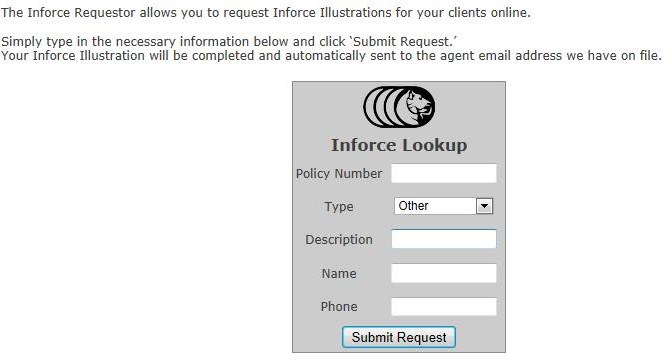
To request an inforce policy illustration, navigate to www.ikclife.com and click on Inforce Requester.


Fill in the necessary information for your request. 

Select "Current" from the dropdown if you would just like a current illustration.  If you would like something other than a current illustration, select "Other" and type in a description for your request.  Be sure to fill in all necessary information so we can contact you if needed. 

Once you have filled in all of the information click "Submit Request."  When possible your request will be generated and sent to the email we have on file within seconds!


Illustration Development Team
illustrationhelp@kclife.com

Wednesday, October 5, 2011

Triple Option UL

The Triple Option UL is another wizard that is now available on iKCLife.  This wizard can now be run without use of the Illustration System.


To access this wizard, navigate to www.ikclife.com and log in.


Note: if you don't have a login, you can get one set up by navigating to www.ikclife.com and clicking on the icon highlighted below:


Once you have logged in, click on Agent Home and the Triple Option UL Wizard under the Wizards tab.


When the wizard is displayed, fill in the information for the client and click "Run Wizard."


The output will then be displayed which will show side by side scenerios of a Term, Cashback, and Universal Life Product for the client.


The Illustration Development Team

Monday, September 19, 2011

iKCLife

iKCLife is Here!

iKCLife is a new and improved website that was designed with the Agent in mind that can be used to assist you with all of your Kansas City Life insurance needs!  Effective today, www.iKCLife.com  will replace www.kclillustration.com.

Here's a quick overview of some of the exciting features you will find on
iKCLife!

  • Product Portfolio - The new Product Portfolio page is a great place to find information about Kansas City Life's Individual Life products.


  • Inforce Requester - Will allow you to request inforce policy illustrations through the website. When possible, requests will be generated and sent out to the email address we have on file within seconds, rather than calling in and waiting on your requests.


  • Wizards - With a single click, the Wizards give you the ability to run Triple Option Term, Term Quote Sheet, Cashback + Life Protector, and Triple Option UL's without the use of the Illustration System.


  • Alerts - Will allow you to view policies assigned to you for which a policy change has taken place in the last sixty days in one or more of the following categories:
*Alerts can also be set up at the General Agent level.


  • Quoting - iKCLife gives you the ability to run New Business and Inforce Illustrations for your clients.


  • Sales Materials - This online catalog will allow you to obtain materials relative to our products, markets, recruiting, and branded materials all with the click of a button.


  • Graphs - The Graphs section will highlight target premiums for all Term, Whole Life, and Universal Life policies that have been sold under your Agent ID(s) over the past six months. 


  • Training - A new Training Section allows you to view training documents, how-to videos, schedule training sessions, and email us your Illustration questions.


Use your existing Username and Password to check out iKCLife!  No username and password?  No problem!  Navigate to www.ikclife.com and click on the icon below to add your information.

Sincerely,
Illustration Development Team