Followers

Monday, June 4, 2018

Accelerated Death Benefit Riders for Variable Universal Life

Effective June 1, 2018, the accelerated death benefit riders for Variable Universal Life have been revised or replaced as detailed below. These changes affect the availability of the riders for both new issues and inforce contracts. A new Chronic Condition Benefit Rider is now available for new issues of Variable Universal Life contracts.

Terminal Illness Rider
  • The Terminal Illness Rider, R215, and corresponding disclosure M626, are discontinued. Exception: During the year 2018, this rider (where available) may be added to an inforce contract with an issue date prior to 06/01/2018.
  • A new Terminal Illness Rider, ICC18R246/R246, is available at issue or with a $25,000 increase for contracts with an issue date of 06/01/2018 and after.

Chronic Condition Benefit Rider
  •  A new Chronic Condition Benefit Rider, ICC18R247/R247, is available at issue or with a $25,000 increase for contracts with an issue date of 06/01/2018 and after.
  • If a contract is issued with the Chronic Condition Benefit Rider, the Terminal Illness Rider must also be issued.
  • Use disclosure form ICC18M726/M726 for both the Chronic Condition Benefit and revised Terminal Illness riders.

Living Benefits Riders
  • The Living Benefits Rider, R181, and corresponding disclosures M417 or M710, are discontinued. Exception: During the year 2018, this rider (where available) may be added to an inforce contract with an issue date prior to 06/01/2018.

Enhanced Living Benefits Rider
  • The Enhanced Living Benefits Rider, R203/R223, is no longer available to be added to an inforce contract with an issue date prior to 06/01/2018. Exception: During the year 2018, this rider (where available) may be added to an inforce contract with a $25,000 increase.
     
Important Notes
  • The availability of the discontinued riders during the transition period is still subject to state approvals.
  • The new riders are not yet approved in California or Florida.
  • California and Florida will continue to issue and illustrate the previous versions of the accelerated death benefit riders.

Please contact us if you have any questions on the riders, how they were implemented on the illustration system, or the transition period.

Have a Great Day,

Illustration Development Team
illustrationhelp@kclife.com
1-800-572-2457 x8162

Friday, April 27, 2018

2018 Transition Plan for Living Benefit Riders

Plan to contact your clients about the Kansas City Life Insurance Company enhanced living benefit riders, which can be added to certain existing policies during the transition period.  

To find out which of your policyholders are eligible, simply log onto iKCLife and select the Alerts tab.  There you will see a category titled Accelerated Death Benefit Riders Transition Period.  If any of your polices are eligible to add living benefits, an icon will appear.  Click on the icon and a list of the eligible policies will be downloaded to your computer for viewing.

The policy list will include all policies in which you are the servicing agent and there are currently no accelerated death benefit riders on the policy.  For each policy, the following information is included in the list: policy number, plan name, issue date, owner name, and whether each rider (CCB, ELB, LBR, and TIR) is available to be added to the policy.

In addition, Compliance-approved client letters are available for approaching those eligible policyholders.

To add a living benefit rider to a policy, complete the Kansas City Life Change Application (A169 or state variation) and the appropriate living benefits disclosure form.  All of these can be found in the Generic Form Picker on iKCLife.

Keep reading to learn more about Kansas City Life Insurance Company's transition plan which allows the following exceptions to further assist you in helping your policyowners gain valuable living benefit protection from their life insurance policies.

Adding to in-force policy exception
  • During 2018, the revised LBR and TIR and the new CCB can be added to an in-force policy with an issue date between Jan. 1, 2017, and Jan. 21, 2018, where available.
  • Agent must fill out the Change Form and the appropriate Disclosure Form.
Older version living benefit riders
  • During 2018, the old LBR and TIR can be added to an in-force policy with an issue date prior to Jan. 22, 2018, where available.
ELB exception
  • During 2018, the ELB can be added to an in-force UL policy with a $25,000 increase, where available.
Level Term exception
  • During 2018, the TIR can be added to an in-force Level Term policy with an issue date prior to Jan. 22, 2018, were available.

Don't hesitate to contact us if you have any questions!

Have a Great Day,

Illustration Development Team
illustrationhelp@kclife.com
1-800-572-2467 x8162


Wednesday, March 21, 2018

Ability to Set Rider Defaults!

One of the requests we received at the 2018 General Agent's Meeting was to add the ability to set rider defaults on the illustration system.  We're excited to announce that it is now possible on all of our systems!  This is one more way you can customize illustrations to the way you sell and save time as a result.  Keep reading to learn where to set your rider defaults on the Quick Quoter, online Illustration System, and the desktop Illustration System.

Quick Quoter

Once you have navigated to the Quick Quoter, look for the "Riders" tab in the top center-left of the screen and click on this tab. 


Now you will see a list of all riders on products available within the Quick Quoter. If you would like to read more about a given rider, you can also click on the rider acronym or full name to show or hide a description. 

Simply check the box to the left of the riders you would like to be added for every illustration (if available for the product and state) and click the "Set Defaults" button at the bottom of the page to save your choices, as seen in the screenshot below.


Now return to the Quick Quoter and refresh the page to apply your defaults. From here on out, whenever you come to the Quick Quoter your defaults will be automatically applied. If you ever want to update your default riders again you can update these through the same process on the Riders tab.

Online Illustration System

Once you have navigated to the online Illustration System, find the wrench icon at the top center-right of the icon bar and select this icon. 


Now look for the "Rider Defaults" tab to the far right of the available tabs and click. Now you will see a list of all available riders. Simply check the box to the left of the riders you would like to be added for every illustration (if available for the product and state) and click the "OK" button at the bottom of the page to save your choices, as seen in the screenshot below.


Now, if you want to illustrate a quote with your new defaults, click on the "New Illustration" icon in the toolbar. From here on out, whenever you come to the Illustration System your defaults will be automatically applied. If you ever want to update your default riders again you can update these through the same process.

Desktop Illustration System

Once you have opened the desktop Illustration System, find the wrench icon at the top center-right of the toolbar and select this icon.


Now look for the "Rider Defaults" tab to the far right of the available tabs and click. Now you will see a list of all available riders. Simply check the box to the left of the riders you would like to be added for every illustration (if available for the product and state) and click the "OK" button at the bottom of the page to save your choices, as seen in the screenshot below.


Now, begin a new illustration to see your defaults applied. From here on out, whenever you come to the Illustration System your defaults will be automatically applied. If you ever want to update your default riders again you can update these through the same process.

Please contact us if you have any questions on setting up your rider defaults on the Quick Quoter, online Illustration System, or the desktop Illustration System.

Have a Great Day,

Illustration Development Team
1-800-572-2467 x8162
illustrationhelp@kclife.com

Tuesday, March 13, 2018

EquiFlex Now Available in the Quick Quoter

The Illustration Development Team is excited to announce that you are now able to illustrate both Indexed Universal Life products in the Quick Quoter with the recent addition of the EquiFlex!

Click here to check out the Quick Quoter, and start generating quotes for your clients right away!

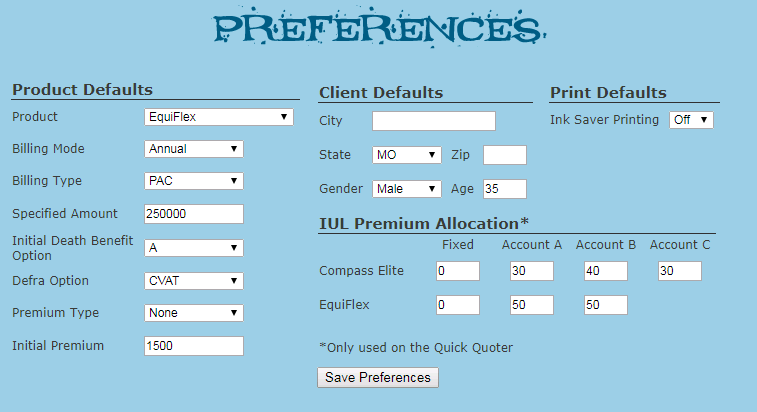
As is the case with the Compass Elite, you are able to set premium allocation defaults for the EquiFlex.  Head right over to your preferences where these options are readily available.


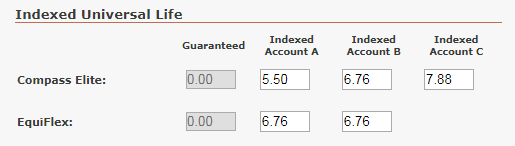
You are also able to change the illustrated interest rates for both indexed accounts available for premium allocation, allowing for more flexibility when deciding the interest rate you would like to show your client.


In addition to releasing the EquiFlex, more updates have been made to the Quick Quoter!  You are now capable of adding an owner to an illustration.  In order to do so, you will select the Owner tab inside of the Client box and then fill out the necessary information.


As always, please contact us if you would like some help running any illustrations or need help getting started using the Quick Quoter.

Have a Great Day,

Illustration Development Team
1-800-572-2467 x8162
illustrationhelp@kclife.com

Monday, February 5, 2018

Accelerated Death Benefit Riders

Effective January 22, 2018, the accelerated death benefit riders have been revised or replaced as detailed below.  These changes affect the availability of the riders for both new issues and inforce policies.  A new Chronic Condition Benefit Rider is now available for new issues of Value Assured and Universal Life policies. 

Cashback Life:
  • The Living Benefits Rider, R229, and corresponding disclosure form M710, are discontinued.  Exception:  During the year 2018, this rider (where available) may be added to an inforce policy with an issue date prior to 01/22/2018.
  • A new Living Benefits Rider, ICC17R240/R240, is available only at issue for policies with an issue date of 01/22/2018 and after.  Exception:  During the year 2018, this rider may be added to an inforce policy with an issue date between 01/01/2017 and 01/21/2018.
  • Use disclosure form ICC17M723/M723 for the new Living Benefits Rider.

Gift of Life:
  • The Living Benefits Rider, R227, and corresponding disclosure form M710, are discontinued.  Exception:  During the year 2018, this rider (where available) may be added to an inforce policy with an issue date prior to 01/22/2018.
  • A new Living Benefits Rider, ICC17R242/R242, is available only at issue for policies with an issue date of 01/22/2018 and after.  Exception:  During the year 2018, this rider may be added to an inforce policy with an issue date between 01/01/2017 and 01/21/2018.
  • Use disclosure form ICC17M723/M723 for the new Living Benefits Rider.

Value Assured:
  • The Living Benefits Rider, R227, and corresponding disclosure form, M710, are discontinued.  Exception:  During the year 2018, this rider (where available) may be added to an inforce policy with an issue date prior to 01/22/2018.
  • A new Chronic Condition Benefit Rider, ICC17R244/R244, is available only at issue for policies with an issue date of 01/22/2018 and after.  Exception:  During the year 2018, this rider may be added to an inforce policy with an issue date between 01/01/2017 and 01/21/2018.
  • A new Terminal Illness Rider, ICC17R241/R241, is available only at issue for policies with an issue date of 01/22/2018 and after.  Exception:  During the year 2018, this rider may be added to an inforce policy with an issue date between 01/01/2017 and 01/21/2018.
  • Use disclosure form ICC17M723/M723 for both the Chronic Condition Benefit and Terminal Illness riders.
  • If a policy is issued with the Chronic Condition Benefit Rider, the Terminal Illness Rider must also be issued.

Universal Life (SuperNOVA, Life Protector, FlexWealth Advantage, EquiFlex IUL, Compass Elite IUL):
  • The Terminal Illness Rider, R160, and corresponding disclosure M305, are discontinued.  Exception:  During the year 2018, this rider (where available) may be added to an inforce policy with an issue date prior to 01/22/2018.
  • The Living Benefits Rider, R181, and corresponding disclosures M417 or M710, are discontinued.  Exception:  During the year 2018, this rider (where available) may be added to an inforce policy with an issue date prior to 01/22/2018.
  • A new Chronic Condition Benefit Rider, ICC17R245/R245, is available at issue or with a $25,000 increase for policies with an issue date of 01/22/2018 and after.  Exception:  During the year 2018, this rider may be added to an inforce policy with an issue date between 01/01/2017 and 01/21/2018
  • A new Terminal Illness Rider, ICC17R243/R243, is available at issue or with a $25,000 increase for policies with an issue date of 01/22/2018 and after.  Exception:  During the year 2018, this rider may be added to an inforce policy with an issue date between 01/01/2017 and 01/21/2018.
  • Use disclosure form ICC17M723/M723 for both the Chronic Condition Benefit and Terminal Illness riders.
  • If a policy is issued with the Chronic Condition Benefit Rider, the Terminal Illness Rider must also be issued.
  • The Enhanced Living Benefits Rider, R204/R224, is no longer available to be added to an inforce policy with an issue date prior to 01/22/2018.  Exception:  During the year 2018, the ELB (where available) may be added to an inforce policy with a $25,000 increase.

Term:
  • The TIR for Term rider, R195, is no longer available to be added to an inforce policy with an issue date prior to 01/22/2018.  Exception:  During the year 2018, the TIR for Term (where available) may be added to an inforce policy with an issue date prior to 01/22/2018.

Important Notes:
  • The availability of the discontinued riders during the transition period is still subject to state approvals.
  • These changes do not apply to accelerated death benefit riders on the variable universal life plans.
  • The new riders are not yet approved in California.

Please contact us if you have any questions on the riders or how they were implemented on the illustration system.

Thank you,

IIllustration Development Team
1-800-572-2467 x8162
illustrationhelp@kclife.com

Friday, December 29, 2017

Compass Elite Released in the Quick Quoter

The Illustration Development Team is excited to announce that Compass Elite is now available in the Quick Quoter!

Click here to check out the Quick Quoter, and start generating quotes for your clients right away.

In addition to features included with previous product releases, Compass Elite has even more options for customization. Head over to your preferences to set premium allocation defaults, saving you even more time when setting up quotes for your clients.


You also now have the option to change the illustrated interest rates for all of the indexed accounts available for premium allocation, allowing for more flexibility when deciding the interest rate you would like to show the client.


We've also put together a great Help Page which explains the Quick Quoter in more detail, including browser specific questions you may have.  Click here to view the Help Page now.

Please contact us if you would like to walk through setting up a Compass Elite or if you have any questions regarding the Quick Quoter.

Have a Great Day,

Illustration Development Team
1-800-572-2467 x8162
illustrationhelp@kclife.com

Monday, November 27, 2017

Quick Quoter History Page

The Quick Quoter History page has an updated look and added functionality!  The ability to search by All, Agent Name, Client Name, and Saved As is now available.  Keep reading to learn more.


In the search by drop-down list choose the field you want to search.  Note: if All is the selected category the entered keyword will be searched in the Agent Name, Client Name, and Saved As columns at the same time.


Once the 'Search by' field is chosen and the keyword entered, click on the magnifying glass or the enter key on your keyboard to run the search.  All cases that meet the search criteria will be returned.  

From here you can hover over the Info icon to see more specific case details or click on the View Wizard icon to pull the case up in the Quick Quoter.  If the case is no longer needed it can be deleted by checking the box and clicking on 'Delete Selected Cases'.  If you want to delete all of the saved cases on the page, checking the box in the header row will automatically check all cases on the page.


Please contact us if you have questions on the Quick Quoter History page or have any suggestions for future updates!

Have a Great Day,

Illustration Development Team
1-800-572-2467 x8162
illustrationhelp@kclife.com