Followers

Thursday, September 27, 2018

Product Revisions

Kansas City Life Insurance Company introduces the revised Gift of Life, Value Assured and Cashback Life products.

The Value Assured and Gift of Life will have no premium changes and minor changes in cash values.

There are minor premium changes on Cashback Life 20 and premium increases on the B250 and B500 for Cashback Life 30. Also, the Cashback Life state exception version for Ohio, Pennsylvania, Utah and Washington will be discontinued as of Oct. 1, and these states will have the base Cashback Life 20 and Cashback Life 30 available.

All applications received in the Home Office for Gift of Life and Value Assured starting Oct. 1 will be issued as the new version of the product.

Beginning Oct. 1, applications written for the Cashback Life product will be issued as the new version of the product. Applications written prior to Oct. 1 and received in the Home Office prior to Oct. 12 will be issued under the old product.    

All updated sales collateral can be found in the Product Portfolio or the Online Sales Material Catalog.

Illustration Development Team
illustrationhelp@kclife.com
1-800-572-2467 x8162

Tuesday, August 28, 2018

Premium Calculation for Universal Life Products

Our Quick Quoter calculators make it easy and fast to figure out how much premium should be paid for a given case setup on universal life products. Through the calculators, you can calculate the premium amount that needs to be paid for the policy to provide coverage or endow in a given year or at a given age. Keep reading to learn how to calculate a premium using our PT calculator (available on all universal life products except Life Protector).

Once you have navigated to the Quick Quoter, choose a universal life product and fill out relevant insured information.


Next update the values section with the desired specified amount, DEFRA option, and death benefit option.


Finally, add any riders you want to be included in the case setup.


Now you are ready to calculate the premium. Choose the appropriate billing mode and billing type, and then click the "PT" icon to the right of the premium field to open the premium to age or year calculator.


Now you should see the calculator inputs. 


You have the option to complete the calculation based on either amount of years in the future, or the future age of the insured. 

If you would like to complete the calculation based on future year, leave the By Year radio selected. If you would like to complete the calculation based on the age of the insured, select the By Age radio and skip down to the "Calculation Type - By Age" section below.

Calculation Type - By Year

Pay Through Year - determines how far into the future the insured will pay the premium. If the insured will pay for the entire life of the policy, this should match the "Achieved at End of Year field that we will discuss later. If the insured would like to pay up the policy in a shorter time frame, such as ten years, update this field to that amount.

Target Cash Value - determines how much cash value will remain in the policy in the year set in the "Achieved at End of Year" field. We suggest leaving the $1,000 amount if you want the policy to provide coverage through your entered year and no longer. If you would like to see the policy endow in this year, update this field to be the same as the entered specified amount.

Achieved at End of Year - this is the year in which the policy will have the amount of cash value entered in the "Target Cash Value" field.

Mortality/Expenses and Interest Rate - this field determines if the calculation will be completed under current or guaranteed assumptions.

Once you have updated these fields, click Calculate. The calculator box will close and the resulting premium will be entered into the Premium field.

Calculation Type - By Age


Pay Through Age - determines until which age the insured will pay the premium and the age in which the policy will have the cash value in the "Target Cash Value" field.

Target Cash Value - determines how much cash value will remain in the policy in the year set in the "Pay Through Age" field. We suggest leaving the $1,000 amount if you want the policy to provide coverage through your entered year and no longer. If you would like to see the policy endow in this year, update this field to be the same as the entered specified amount.

Mortality/Expenses and Interest Rate - this field determines if the calculation will be completed under current or guaranteed assumptions.

Once you have updated these fields, click Calculate. The calculator box will close and the resulting premium will be entered into the Premium field.

Please let us know if you have any questions!

Illustration Development Team
illustrationhelp@kclife.com
1-800-572-2467 x8162


Tuesday, August 14, 2018

Supplemental Income for Retirement Plan using Indexed Universal Life

A new sales material, Supplemental Income for Retirement Plan Using Indexed Universal Life, can be accessed through iKCLife!

To find this brochure navigate to the Product Portfolio.  Once here select Universal Life and then Indexed.  The brochure is available in each section of our currently offered Indexed Universal Life plans.


After selecting one of the Indexed Universal Life products you'll see a Product Documentation section that houses all of the sales materials for that particular product.  Simply click on the Supplemental Income for Retirement Plan Using Indexed Universal life image to view this brochure.


If you are wanting to order this form from our supply department navigate to the Online Sales Material Catalog.  There are multiple ways to search for a form including category, keyword, product type, market segment, and form.  In the below image the form number for the Supplemental income for retirement plan using Indexed Universal Life, 12326, was entered in the form number box.  After clicking the 'Search' button the form was returned.  From here click on the clipboard icon which will open a page where you can enter how many copies of the form you need and where they should be mailed.


Illustration Development Team
illustrationhelp@kclife.com
1-800-572-2467 x8162

Wednesday, August 1, 2018

State Approvals Map Update

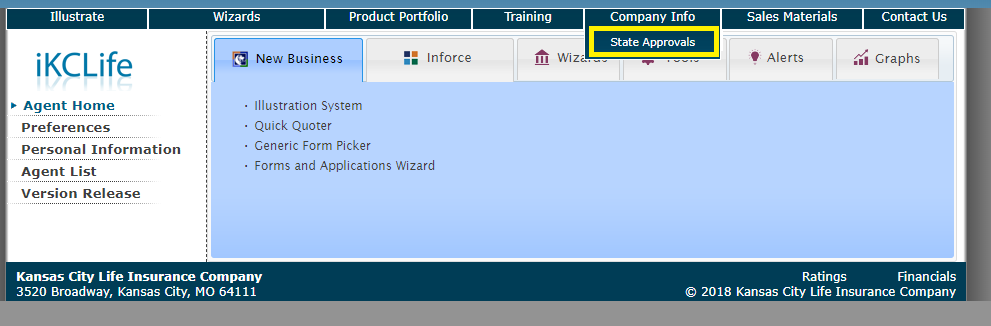
iKCLife gives you the ability to see which products and riders are approved in all of the states. We have recently made this even easier by updating the look and clarity of the State Approvals map. To take a look, complete the following steps:

Log in to www.ikclife.com.

Note: if you haven't created a username and password, you can login using your KCLIC credentials or navigate to www.ikclife.com and click on the icon highlighted below to create a login:


Once you have logged in, click on "Company Information" and then "State Approvals".


All you have to do now is select the state that you want to see.


For example, if you select Missouri the following would show:


This includes all products approved in Missouri and also which riders are approved for each product.

Illustration Development Team

Monday, July 9, 2018

Application Packets

Did you know application packets are now available through the Forms and Applications wizard on iKCLife?!

To obtain the application packets navigate to the Forms and Applications wizard on iKCLife.  Don't forget you can sign into iKCLife using your kclic credentials!


Once here select the Issue State and the App Packets radio button.  The available packets will be listed below and can be opened by clicking on the link.  Once opened the packet can be printed or saved.


Please let us know if you have any questions!

Illustration Development Team
illustrationhelp@kclife.com
1-800-572-2467 x8162

Monday, June 4, 2018

Accelerated Death Benefit Riders for Variable Universal Life

Effective June 1, 2018, the accelerated death benefit riders for Variable Universal Life have been revised or replaced as detailed below. These changes affect the availability of the riders for both new issues and inforce contracts. A new Chronic Condition Benefit Rider is now available for new issues of Variable Universal Life contracts.

Terminal Illness Rider
  • The Terminal Illness Rider, R215, and corresponding disclosure M626, are discontinued. Exception: During the year 2018, this rider (where available) may be added to an inforce contract with an issue date prior to 06/01/2018.
  • A new Terminal Illness Rider, ICC18R246/R246, is available at issue or with a $25,000 increase for contracts with an issue date of 06/01/2018 and after.

Chronic Condition Benefit Rider
  •  A new Chronic Condition Benefit Rider, ICC18R247/R247, is available at issue or with a $25,000 increase for contracts with an issue date of 06/01/2018 and after.
  • If a contract is issued with the Chronic Condition Benefit Rider, the Terminal Illness Rider must also be issued.
  • Use disclosure form ICC18M726/M726 for both the Chronic Condition Benefit and revised Terminal Illness riders.

Living Benefits Riders
  • The Living Benefits Rider, R181, and corresponding disclosures M417 or M710, are discontinued. Exception: During the year 2018, this rider (where available) may be added to an inforce contract with an issue date prior to 06/01/2018.

Enhanced Living Benefits Rider
  • The Enhanced Living Benefits Rider, R203/R223, is no longer available to be added to an inforce contract with an issue date prior to 06/01/2018. Exception: During the year 2018, this rider (where available) may be added to an inforce contract with a $25,000 increase.
     
Important Notes
  • The availability of the discontinued riders during the transition period is still subject to state approvals.
  • The new riders are not yet approved in California or Florida.
  • California and Florida will continue to issue and illustrate the previous versions of the accelerated death benefit riders.

Please contact us if you have any questions on the riders, how they were implemented on the illustration system, or the transition period.

Have a Great Day,

Illustration Development Team
illustrationhelp@kclife.com
1-800-572-2457 x8162

Friday, April 27, 2018

2018 Transition Plan for Living Benefit Riders

Plan to contact your clients about the Kansas City Life Insurance Company enhanced living benefit riders, which can be added to certain existing policies during the transition period.  

To find out which of your policyholders are eligible, simply log onto iKCLife and select the Alerts tab.  There you will see a category titled Accelerated Death Benefit Riders Transition Period.  If any of your polices are eligible to add living benefits, an icon will appear.  Click on the icon and a list of the eligible policies will be downloaded to your computer for viewing.

The policy list will include all policies in which you are the servicing agent and there are currently no accelerated death benefit riders on the policy.  For each policy, the following information is included in the list: policy number, plan name, issue date, owner name, and whether each rider (CCB, ELB, LBR, and TIR) is available to be added to the policy.

In addition, Compliance-approved client letters are available for approaching those eligible policyholders.

To add a living benefit rider to a policy, complete the Kansas City Life Change Application (A169 or state variation) and the appropriate living benefits disclosure form.  All of these can be found in the Generic Form Picker on iKCLife.

Keep reading to learn more about Kansas City Life Insurance Company's transition plan which allows the following exceptions to further assist you in helping your policyowners gain valuable living benefit protection from their life insurance policies.

Adding to in-force policy exception
  • During 2018, the revised LBR and TIR and the new CCB can be added to an in-force policy with an issue date between Jan. 1, 2017, and Jan. 21, 2018, where available.
  • Agent must fill out the Change Form and the appropriate Disclosure Form.
Older version living benefit riders
  • During 2018, the old LBR and TIR can be added to an in-force policy with an issue date prior to Jan. 22, 2018, where available.
ELB exception
  • During 2018, the ELB can be added to an in-force UL policy with a $25,000 increase, where available.
Level Term exception
  • During 2018, the TIR can be added to an in-force Level Term policy with an issue date prior to Jan. 22, 2018, were available.

Don't hesitate to contact us if you have any questions!

Have a Great Day,

Illustration Development Team
illustrationhelp@kclife.com
1-800-572-2467 x8162