Followers

Wednesday, March 16, 2016

Delete Functionality on Wizard History Pages


We recently added the ability to delete saved cases on all of the wizards on iKCLife!

This includes the Quick Quoter, Income Search, Triple Option Term, Triple Option UL, Triple Option WL, Quote Sheet, Cashback + Life Protector, IAO Fact Finder, and the Life Protector & Value Assured Crossover Point.  We hope this enhancement will allow you to more easily find a particular saved case.  To take advantage of the delete functionality, go to the history page by clicking the 'View Past [name of wizard] PDFs' link of the wizard that you are wanting to delete cases for.


To delete a saved case, check the box of the case you want deleted and click on the 'Delete all checked cases' button.  The line of any selected case will be highlighted red.


Next, you'll be prompted to verify that you want the case deleted.  Clicking 'OK' will delete the selected case and 'Cancel' will leave the case on your account.


 If you want to delete all of the saved cases on the page, checking the box under 'Remove Case' will automatically check all cases on the page.

Have a Great Day,

Illustration Development Team
1-800-572-2467 x8162
illustrationhelp@kclife.com

Friday, February 12, 2016

Level Term Series and ChoiceTerm 20 Product Revisions

To help you come out on top in the highly competitive term insurance market, Kansas City Life Insurance Company announces revisions to its Level Term Series and ChoiceTerm 20 products.

The product revisions include the following highlights:
  • ChoiceTerm 20 level premiums have been reduced to improve its competitive position.
  • The minimum issue age has been lowered to 18 for the Level Term Series and ChoiceTerm 20 products.
  • The minimum issue limit for ChoiceTerm 20 has reduced from $1 million to $250,000.
  • The minimum death benefit limit after conversion has reduced from $250,000 on Level Advantage to $100,000 and $1 million on ChoiceTerm 20 to $250,000.
  • The addition of the Standard Select Nontobacco risk class to the Level Term and Level Term Advantage products.
  • The policy fee on the ChoiceTerm 20 has been lowered to $75 from $100.
  • Premium banding has been added on ChoiceTerm 20 (available bands of B250, B500, B1000).
  • Conversion privileges with reduced conversion credit. All plans may be converted to any permanent plan including the Life Protector.
On the illustration system, the old term plans will have the year they came out in the product name. The revised terms will have no year next to the name.  For example, the old version of the level 20 term will be listed as Level 20 (2012) and the revised version will be listed as Level 20.  To see if your state has approved the revised terms check the State Approvals Map on iKCLife.

If your state has approved the revised term plans, the following wizards on iKCLife will use the new terms: Triple Option Term, Triple Option UL, Triple Option WL, Quote Sheet and the IAO Fact Finder.  If your state has not yet approved the revised terms the wizards will use the old term plans.

Please contact us if you have any questions about the revised term plans or how the illustration system is handling them.

Have a Great Day,

Illustration Development Team
1-800-572-2467 x8162

Friday, January 8, 2016

Multiple Agents in the Quick Quoter

The ability to have multiple sets of agent information on a single profile is now available for the Quick Quoter!

To use this feature you will first need to update your agent profile to include the information for all new agents. After logging in to iKCLife you will see a new option on the left side of the Agent Homepage called 'Agent List'.


Clicking this link brings you to a screen where you are able to input each of the agents that you would like to run illustrations for.


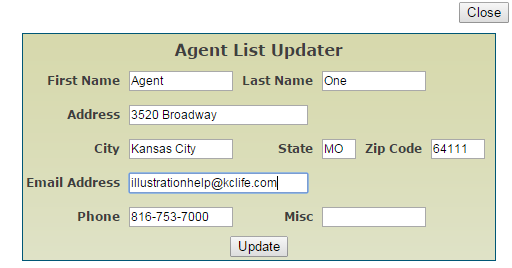
Click 'Add Entry' to add a new agent or 'Update Entry' to modify an existing agent. Selecting either of these will open the 'Agent List Updater' screen.


Once you have filled out the agent’s details and have selected the 'Update' button, that agent’s information has been saved for future use with the Quick Quoter. If the new agent does not show up in the Agent List after selecting the 'Update' button, simply refresh the website.

Once you have added the agents that you would like to run illustrations for, navigate to the Quick Quoter. The output section now has the option to either run the illustration as yourself or as another agent that you have previously entered.


Selecting Another Agent allows you to pick which agent’s information you would like to appear on the illustration. Once you have finished setting up the illustration and have run the case, check the output. It should have the new agent’s information at the top of the illustration rather than your own.


If you have any questions about using multiple agents in the Quick Quoter, or if you would like us to guide you through the process, please feel free to give us a call or send us an email.

Have a Great Day,

Illustration Development Team
1-800-572-2467 x8162
illustrationhelp@kclife.com

Friday, October 30, 2015

Life Protector & Value Assured Crossover Point Wizard

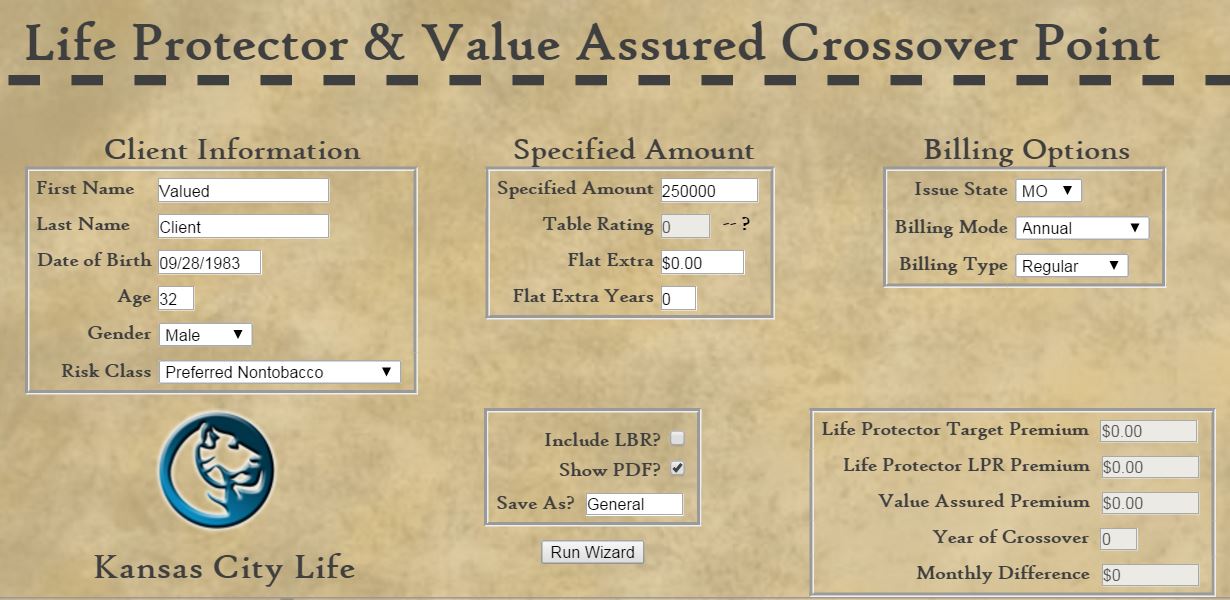
The Life Protector & Valued Assured Crossover Point Wizard is now available on iKCLife!  

To use the new wizard sign in to iKCLife.  Once signed in click on the Wizards tab and then the Life Protector & Value Assured Crossover Point link.


The first step for the wizard is to fill out the client information, specified amount, and billing options sections.


After these sections are completed there are some optional things that can be added.  To include the Living Benefits Rider or generate the full crossover point PDF check the applicable box.  Like all of the wizards on iKCLife every case is automatically saved so a descriptive name can be entered in the Save As? box to easily find previous cases.  Clicking the Run Wizard button will produce the results.


Below is a sample set of results.  This section includes the annual amount for the Life Protector Target and LPR Premium and the Value Assured Premium.  The PDF generated always uses the LPR premium so each case will run to age 120.  The target premium was included to easily see what the commission would be on the case.  In this particular case the target and LPR premium are the same but a difference in these premiums will happen in certain cases.  The Year of Crossover is the point at which the client will have paid less for Value Assured coverage then for Life Protector coverage.  The Monthly Difference shows the monthly difference in premium between the Value Assured and Life Protector.


If the Show PDF? box was checked an illustration like below will be generated.    

Two columns that don't show up on a base illustration are Total Net Cost and IRR.  Total Net Cost is the total net outlay should the client drop coverage at the end of the policy year.  It is the sum of the premiums paid less any cash value returned at surrender.  The IRR represents the before-tax rate of return if the difference between the Life Protector and Value Assured premiums were invested for a specified number of years and the Value Assured cash value was returned at the end of those specified years.

Please contact us if you have any questions on the Life Protector & Value Assured Crossover Point Wizard or if you would like to walk through running one together.

Have a Great Day,

Illustration Development Team
1-800-572-2467 x8162

Monday, October 5, 2015

Quick Quoter Feedback

When the Illustration Development Team released the Quick Quoter on iKCLife we had a few goals in mind.  We wanted to give you the ability to quickly run quotes and only generate full illustrations when you needed them.  We also wanted the interface to have a fresh look and be interactive so you could easily tell if an input was not valid or had been updated.  As we add more products and functionality to the Quick Quoter we want your feedback so we can make sure we're developing the best tool for you to obtain quotes and illustrations!  

To make it easier to give us feedback and ask questions we've added a 'Send Feedback' link at the top of the Quick Quoter screen.


Clicking the 'Send Feedback' link will open up the Feedback box.  The name, address, and phone number fields will be prepopulated if your personal information is already entered on iKCLife.  These fields can still be edited, if needed.  After typing in your question or feedback and clicking on the 'Send Email' button a confirmation message will be shown to let you know that we have received your comments.  To go back to the Quick Quoter screen simply click on the 'Close' button.


All of these comments are emailed directly to our development team so we can quickly respond to any questions and discuss all feedback that is sent to us.

Have a Great Day,

Illustration Development Team
1-800-572-2467 x8162
illustrationhelp@kclife.com
Friday, September 11, 2015

Maximum ELB Benefit Box

The Enhanced Living Benefits (ELB) rider is a popular way to enhance the benefits of a life insurance policy.  To make illustrating this rider even easier we have added a max ELB benefit box that will calculate the maximum benefit amount for you!

The ELB rider provides a prepayment of the death benefit under either, or both, of two triggers:

1.  Confinement trigger* which requires the insured to be confined to and receiving care in an eligible nursing home, or
2.  Chronic condition trigger* which typically requires the insured to have a condition resulting in being permanently unable to perform, without substantial assistance from another individual, at least two of six activities of daily living (ADLs).

*Benefit triggers, elimination period and concurrent benefit payments may vary by state.

The total benefit provided by this rider cannot exceed $500,000* or 90% of the base policy's Specified Amount.  

*This is subject to state availability.  The maximum in some states is $350,000.

For more information about the ELB rider please consult the Product Portfolio found on iKCLife

To take advantage of this rider simply check the box next to ELB in the Riders section.


In the Rider Information section, checking the 'Max ELB Benefit' box will calculate the max ELB amount based on your case setup.  The amount calculated will be shown in the 'ELB Amount' box.  After checking the max ELB benefit box any changes you make to your case that would effect the ELB amount, like specified amount, will automatically be taken into account and will increase/decrease the ELB amount.


Let us know if you have any questions on the Enhanced Living Benefits rider or how to add it to your illustration.

Have a Great Day,

Illustration Development Team
1-800-572-2467 x8162
illustrationhelp@kclife.com

Tuesday, August 25, 2015

Changing the Illustrated Interest Rate

Did you know you can change the illustrated interest you use on your illustrations?  For example, say you want to take a look at illustrations using the new maximum illustrated rates for the EquiFlex Indexed Universal Life.  Effective September 1, 2015, the maximum illustrated rate for the EquiFlex will be 6.88% and for the EquiFlex (IN, PA) it will be 6.32%.  Keep reading to learn how to make this change on both the online illustration system and the desktop system. 

If you are using the online illustration system

1.  Select the wrench icon at the top of the input screen.


2.  Select the name of the product whose interest rate you would like to change.


 3. You can now edit the interest rate below the list.  Once you have changed the interest rate to what you want to illustrate at, click 'OK'.


4. You will see a confirmation message that lets you know the rates were successfully updated.  Clicking on the 'Illustration System' icon in the upper left corner will then return you to the input screen.


If you are using the desktop system

1.  First, select the wrench icon at the top of your window.


 2.  In the options window that opens on your screen, select the 'Individual Life' tab.


3. Next, select the 'Interest Rates' tab.


 4.  Double click the 'Current' rate you are wanting to update.  After you input the rate you want to use, click the 'OK' button to accept the changes.


Have a Great Day,

Illustration Development Team
1-800-572-2467 x8162
illustrationhelp@kclife.com