Followers

Tuesday, July 15, 2014

Ask the Development Team

 
One of the training tools that can be found on iKCLife is called Ask the Development Team.  This is a quick way to send us a question that you may have.  Some examples could be if you have a question on how to use the illustration system, a product related question, or a technical issue.  Ask away!
 
To access this tool you must first sign into www.iKCLife.com.


After you have logged in, click on 'Training' and then 'Ask the Development Team'.
 
 
You can now fill out the below form with your name, contact information, and the question you have for the development team.  This will be emailed directly to us and we will then either email or call you with the answer to your question. 


Have a Great Day,

Illustration Development Team
illustrationhelp@kclife.com
1-800-572-2467 x8162

Tuesday, July 1, 2014

Guide to Commission Calculations

 
Did you know we have a Guide to Commission Calculations that can be found on iKCLife?!  This guide covers everything from general information to specific commission facts on the different types of products Kansas City Life offers.  There are definitions, examples on how your commission will be calculated in different scenarios, and much more! 
 
To begin, navigate to www.ikclife.com and log in.  Don't forget you are now able to sign into iKCLife using your kclic.net credentials!
 
Once logged in, hover over 'Illustrate' and click on 'Agent Home'.
 

Next, click on the tab named 'Tools'.  On this tab you will see the link for the Guide to Commission Calculations. 

 
The guide can also be found when you're in the Illustration System.  Simply click on the below icon and the guide will open up.

 
Please don't hesitate to contact us if you have any questions.

Have a Great Day,

Illustration Development Team
illustrationhelp@kclife.com
1-800-572-2467 x8162

Wednesday, June 11, 2014

Living Benefits Rider

The Living Benefits Rider (LBR) is now available for sale with the Cashback Life, Value Assured and Gift of Life in many states!
 
A quick way to see if the LBR is approved for a specific state and product is to look at the State Approvals Map.
 
Please do not hesitate to contact me if you have any questions.
 
Have a Great Day,

Illustration Development Team
1-800-572-2467 x8162
illustrationhelp@kclife.com

Friday, May 30, 2014

CVAT or Guideline?

When should I use CVAT vs. Guideline?  This is a question we frequently get when helping an agent set up a new business illustration.  Below explains what CVAT and Guideline mean and some scenarios of when to use each one.
 
Cash Value Accumulation Test (CVAT) and Guideline Premium (Defra) are types of IRS/DEFRA testing that have components that must be met so a policy qualifies as life insurance under IRS section 7702.
 
CVAT
This type of testing has one component that must be met.
  1. A contract meets the cash value accumulation test of this subsection if, by the terms of the contract, the cash value of such contract may not at any time exceed the net single premium which would have to be paid at such time to fund future benefits under the contract.  If the cash value does exceed the net single premium the Illustration System will raise the death benefit to insure the life policy passes the cash value accumulation test.
Guideline
This type of testing has two components that both must be met.
  1. The sum of the total premiums paid under the life contract cannot exceed the greater of the Guideline Single Premium or the accumulated Guideline Level Premium.  Premium payments will be limited and the policy value "force outs" will be taken on the Illustration System to guarantee that this requirement is met.
  2. If the specified amount of the policy at any time is less than the applicable cash value multiplied by the corridor rate the policy will enter the "cash value corridor" and the death benefit for the period will be increased.
CVAT works better for clients:
  • Choosing a level death benefit or funding at the 7-pay limit for 7 years since there are no limits on premium payments
  • Looking to highly fund their policies (in excess of Guideline premium limits), over a short period of time
  • Requiring future reductions in their policy face amount
  • Purchasing a guaranteed life insurance product which will be funded past age 100
Guideline works better for clients:
  • Maximizing their late duration cash and death benefit while funding at the Guideline Single Premium limit, assuming the death benefit will go into the corridor in the future
  • Choosing an increasing death benefit (Option B) and wish to pay the maximum non-MEC premium for more than 7 years before switching to a level death benefit option (Option A)

Have a Great Day,

Illustration Development Team
1-800-572-2467 x8162
illustrationhelp@kclife.com

Monday, May 12, 2014

Updating Preferences

A great time saver on setting up illustrations is to update your preferences before you start.  You are able to set up defaults for billing mode, billing type, specified amount, city, state, zip, gender and age.  For instance if you sell mostly in one state simply update the state in the preferences section.  That way you won't have to change the state for every single illustration you run!  
 
To begin, go to www.ikclife.com and log in.
 
Hover over 'Illustrate' and click on 'Agent Home'.
 
 
Next, click on 'Preferences'.
 
 
Now, you can update the preferences to your choice.  After you are done updating the preferences click on 'Update Preferences' to save them.  Updating the preferences here will update them for the online illustration system and all of the wizards. 


Please contact us if you have any questions!

Have a Great Day,

Illustration Development Team
1-800-572-2467 x8162
illustrationhelp@kclife.com

Tuesday, April 29, 2014

Triple Option Whole Life Concept

Check out our new concept called Triple Option WL!

The Triple Option WL concept will show side by side scenarios of how a client's coverage can be met by a Term Product, Cashback Product and the Value Assured.  Some information each scenario will show are total premium, return of premium and net cost.


To find the Triple Option WL wizard go to www.ikclife.com and click on the 'Wizards' tab.
 

It can also be added as a supplemental on the online new business system or the desktop system.  Simply check the box and the concept will automatically be added to the illustration.


Have a Great Day,

Illustration Development Team
1-800-572-2467 x8162

Friday, April 11, 2014

Income Search

Today I wanted to take some time and walk through how to set up one of our more popular sales concepts, the Income Search.  The Income Search will solve for the max level income the client can take based on the inputs you select.

To begin, navigate to www.ikclife.com and login.  Don't forget you are now able to sign into the illustration system using your kclic.net credentials!

Once you have logged in, click on 'Illustration System' on the New Business Illustrations tab.  Choose the product you would like to quote and enter in the client's information.  The Income Search is available on the following products:
FlexWealth Advantage, Life Protector, SuperNOVA, EquiFlex - IUL and the Accumulator VUL.

Next choose the insured's gender, enter in the date of birth, and select the risk class you would like to quote.  Adjust the billing mode and type if needed and enter the specified amount of your choice.  Now you can either calculate the premium or set up your own premium schedule.

You are now ready to add the Income Search.  To do so, click on the clipboard to get to the available sales concepts and click on the green plus sign to add the Income Search.   


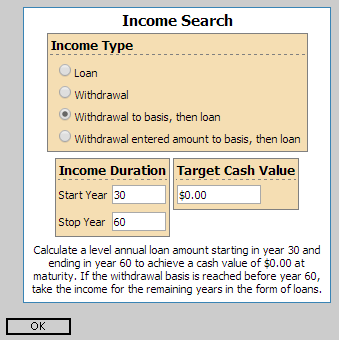
Here you can choose what type of income you would like to take and for how long.  Please note the income duration boxes use policy years and not age.


After clicking on the magnifying glass to run the illustration you will see the pages for the sales concept titled 'Loans and Withdrawals Supplemental Illustration' after the initial illustration.  One of the pages will have the cash flow summary like below.  There will also be a second illustration that takes the income into account.


If you have any questions or you would like to walk through setting up an income search on an illustration don't hesitate to contact us!

Illustration Development Team
1-800-572-2467 x8162
illustrationhelp@kclife.com