The Cashback + Life Protector concept allows you to show a client the benefits of buying both a Cashback Life 20 or 30 and a Life Protector policy. This concept presents a way for clients to have a higher amount of coverage for the short term and a smaller amount of coverage for the long term.
At the end of the 20 or 30 year period of the Cashback Life, the cash that the client would receive back could then be used to pay up the Life Protector policy. In some cases there may be enough cash value in the Cashback Life product for the client to pay up the Life Protector and still take some money home!
Click to view the video below for instructions on how to set this concept up in the Illustration Software.

Thursday, March 31, 2011
Wednesday, March 23, 2011
Comparison Illustrations
The Comparison feature in the Illustration System is a great tool that will allow you to compare up to four illustrations so that you can show your client how each policy may perform side-by-side and on just a few pages.
Click below to view a quick "How-To" video that will explain how to run a Comparison Illustration.
Jill Parsons
Illustration Development Team
1-800-572-2467 x8162
illustrationhelp@kclife.com
Click below to view a quick "How-To" video that will explain how to run a Comparison Illustration.
Jill Parsons
Illustration Development Team
1-800-572-2467 x8162
illustrationhelp@kclife.com
Wednesday, March 16, 2011
Supernova - Avoiding MEC
Each week we receive calls about how to set up a Supernova illustration for a young individual while avoiding having the policy become a Modified Endowment Contract (MEC).
Click below to see a quick video on how this can be accomplished.
Click below to see a quick video on how this can be accomplished.
Wednesday, March 2, 2011
Adding Applications to Your Illustration
We have received a lot of calls with questions pertaining to application/forms, where they can be found, and what is required for submission. This feature is actually available within the Illustration System for your convenience! We have put together a video with instructions on how to add and see what application/forms would be required for new business submission. Simply click on the video below for a quick "how-to" tutorial.
As always, please feel free to call us with any questions you may have.
Sincerely,
Jill Parsons
Illustration Development Team
1-800-572-2467 x8162
illustrationhelp@kclife.com
As always, please feel free to call us with any questions you may have.
Sincerely,
Jill Parsons
Illustration Development Team
1-800-572-2467 x8162
illustrationhelp@kclife.com
Wednesday, February 23, 2011
Running a Current Inforce Illustration
Running a current inforce illustration is a simple process that can be completed in as little as a few minutes. We run current illustrations every day, so we thought we would take a minute to explain how this process works and where you can go to obtain current illustrations for your clients.
If you are the assigned agent, the policy has been in force for at least one year, the policy is above the minimum specified amount, and the product type is in our list of illustratable inforce products below, then the policy can be illustrated.

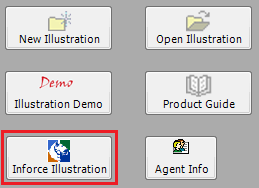
To access your inforce policies, click on the Inforce Illustrations button in your desktop software, or you can navigate to www.ikclife.com. Both options will take you to a login screen.

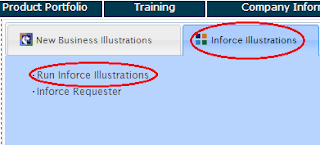
Once you have logged in, click on "Run Inforce Illustrations."


If you are the assigned agent, the policy has been in force for at least one year, the policy is above the minimum specified amount, and the product type is in our list of illustratable inforce products below, then the policy can be illustrated.

To access your inforce policies, click on the Inforce Illustrations button in your desktop software, or you can navigate to www.ikclife.com. Both options will take you to a login screen.
PLEASE NOTE: If you do not have a username and password, click on "Create User" and you will be able to set one up.
Once you have logged in, click on "Run Inforce Illustrations."
Type in the policy number you are trying to access and click, “OK.”

Once the policy summary comes into view, click on "View Illustration."

Once, the input screen comes up, to run a current inforce illustration, all you need to do is click on the "Illustrate" button at the top. This will run the illustration with the current parameters.

Please feel free to contact us with any questions you may have.
Illustration Development Team
1-800-572-2467 x8162
Wednesday, February 16, 2011
Universal Life and Issue Ages 0-14
One of the most common calls we receive related to young children, is how to set them up for our Supernova or Flexwealth Advantage Universal Life.
One important tip to remember for issue ages 0-14 is that for both the Supernova and Flexwealth Advantage, the child has to be quoted as Preferred Non-Tobacco. The easiest way to set up the illustration for these issue ages is to first select Preferred Non Tobacco as the risk class and to then input the child's birthday. If you leave the risk class as Standard Non Tobacco and input the birthday, the age will default to 15 because age 15 is the youngest age that can be quoted as Standard Non-Tobacco.
Please refer to the charts below for any questions you have related to issue age or risk class for these products.


One important tip to remember for issue ages 0-14 is that for both the Supernova and Flexwealth Advantage, the child has to be quoted as Preferred Non-Tobacco. The easiest way to set up the illustration for these issue ages is to first select Preferred Non Tobacco as the risk class and to then input the child's birthday. If you leave the risk class as Standard Non Tobacco and input the birthday, the age will default to 15 because age 15 is the youngest age that can be quoted as Standard Non-Tobacco.
Please refer to the charts below for any questions you have related to issue age or risk class for these products.


Wednesday, February 9, 2011
New Features of Version 4.33!
We've had a few calls and questions come in, so I wanted to take a minute to point out the new features of our latest version, 4.33.
If you have not yet updated your software to version 4.33, you can do so by clicking on "Tools" in the Illustration System and clicking on "Check for Updates."

To help make agents more aware of the inforce illustrating capabilities we have in place, we have added an "Inforce Illustration" button within the software. Clicking this button will pull up our website, at which time you can enter in your username and password to run inforce illustrations.


If you have not yet updated your software to version 4.33, you can do so by clicking on "Tools" in the Illustration System and clicking on "Check for Updates."
To help make agents more aware of the inforce illustrating capabilities we have in place, we have added an "Inforce Illustration" button within the software. Clicking this button will pull up our website, at which time you can enter in your username and password to run inforce illustrations.
Please Note: If you do not yet have a username and password set up, no problem! Just click on the link on the website and you will be able to set one up. If you have any problems with setup or if you aren't sure what your existing username and password is, just give us a call and we can assist you.
We have also added a Survivor Cash and Income Needs Package to the software that will allow you to determine the need for your clients should the death of a spouse occur.
Please refer to our "Survivor Cash and Income Needs Package" blog to access detailed instructions on how to utilize this package to fit your clients' needs!
Lastly, the Designation of Death Benefit Payout Endorsement Rider (DDBPER) has been added to the software for all new business policies. This rider allows the owner to choose how the death benefit is to be paid out. At the time the endorsement is added, the owner will designate a lump sum benefit that is immediately paid out at proof of death as well as an installment benefit amount paid over a designated number of installment benefit years after proof of death. In addition to new business policies, this rider can also be added to select inforce policies. To access more information about this new rider, click on the rider in the illustration system, and then place your curser over the open book for details.
Feel free to give us a call with any questions you may have.
Until Next Time!
Jill Parsons
Illustration Development Team
1-800-572-2467 x8162
Subscribe to:
Posts (Atom)