Followers

Tuesday, April 29, 2014

Triple Option Whole Life Concept

Check out our new concept called Triple Option WL!

The Triple Option WL concept will show side by side scenarios of how a client's coverage can be met by a Term Product, Cashback Product and the Value Assured.  Some information each scenario will show are total premium, return of premium and net cost.


To find the Triple Option WL wizard go to www.ikclife.com and click on the 'Wizards' tab.
 

It can also be added as a supplemental on the online new business system or the desktop system.  Simply check the box and the concept will automatically be added to the illustration.


Have a Great Day,

Illustration Development Team
1-800-572-2467 x8162

Friday, April 11, 2014

Income Search

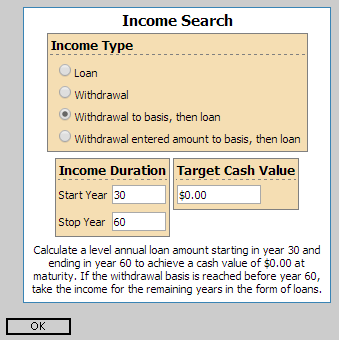
Today I wanted to take some time and walk through how to set up one of our more popular sales concepts, the Income Search.  The Income Search will solve for the max level income the client can take based on the inputs you select.

To begin, navigate to www.ikclife.com and login.  Don't forget you are now able to sign into the illustration system using your kclic.net credentials!

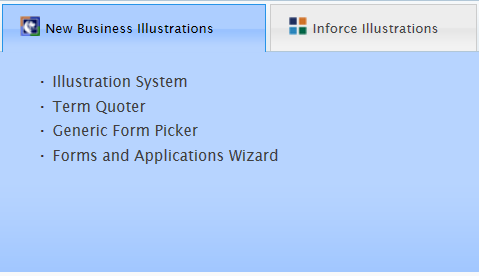
Once you have logged in, click on 'Illustration System' on the New Business Illustrations tab.  Choose the product you would like to quote and enter in the client's information.  The Income Search is available on the following products:
FlexWealth Advantage, Life Protector, SuperNOVA, EquiFlex - IUL and the Accumulator VUL.

Next choose the insured's gender, enter in the date of birth, and select the risk class you would like to quote.  Adjust the billing mode and type if needed and enter the specified amount of your choice.  Now you can either calculate the premium or set up your own premium schedule.

You are now ready to add the Income Search.  To do so, click on the clipboard to get to the available sales concepts and click on the green plus sign to add the Income Search.   


Here you can choose what type of income you would like to take and for how long.  Please note the income duration boxes use policy years and not age.


After clicking on the magnifying glass to run the illustration you will see the pages for the sales concept titled 'Loans and Withdrawals Supplemental Illustration' after the initial illustration.  One of the pages will have the cash flow summary like below.  There will also be a second illustration that takes the income into account.


If you have any questions or you would like to walk through setting up an income search on an illustration don't hesitate to contact us!

Illustration Development Team
1-800-572-2467 x8162
illustrationhelp@kclife.com

Monday, March 31, 2014

Online Sales Materials Catalog

Did you know you can download and order sales materials directly from iKCLife?  We have many different types of sales materials available to you including Consumer Brochures, Fact Sheets, Sales Guides and much more.

To find the sales materials go to www.ikclife.com and click on 'Sales Materials'.


You will then have the option to search by category, a keyword, product type, market segment or form number.  For example, if you type in Life Protector in the keyword box and hit search, all applicable sales materials for that product will be populated.


To download a sales material to your computer click on the green arrow.  From here you can view, save or print that sales material.  Being able to download sales materials from our website is a fast and easy way to get the most up to date forms and brochures. It also comes in handy if you have a client that wants information on a certain type of insurance or product emailed to them.

  
If you would like a hard copy of one of the sales materials click on the clipboard.  This will take you to a screen where you can enter where you want the sales materials mailed to and how many copies you would like.  Our supply department will then process the request, and you will receive the requested sales materials in the mail.


Please let us know if you have any questions.

Illustration Development Team
1-800-572-2467 x8162
illustrationhelp@kclife.com

Monday, February 3, 2014

Quick Quoter

You are now able to quote all of Kansas City Life's term, return of premium, and whole life products in our Quick Quoter!  The Quick Quoter allows you to quickly run quotes and only generate full illustrations when you need them.  The illustrations have also been condensed, so there are fewer pages compared to the full illustrations run on the new business illustration system.

To begin, navigate to www.ikclife.com and log in.  If you do not have a log in, you can create one by clicking on 'Create User'.


Next, click on 'Quick Quoter' on the New Business Illustrations tab.


This will take you to the Quick Quoter where you can choose which product you want to quote and also enter in all of the specifics for the client and case.


To see only the premium amounts for the case, click on 'Run Case,' which will produce output like below.


If you decide you want to see the full illustration, simply check mark the 'View Full Illustration (PDF)' box and click on 'Run Case' again.  This will create a PDF that you can then save or print.


If you have any questions on the Quick Quoter, or would like to walk through putting one together please give us a call.

Illustration Development Team
1-800-572-2467 x8162
illustrationhelp@kclife.com


Friday, January 3, 2014

Computer Based Illustration System Upgrade

In 2014 the Computer Based Illustration System is moving to the .NET 4.5 Framework in order to work effectively on Windows 7 and Windows 8 based computers.
  • Microsoft Windows XP will no longer be compatible with the Computer Based Illustration System.
    • Microsoft terminated mainstream support of Windows XP on April 14, 2009.
    • Microsoft will terminate their pay-per-incident support for Windows XP on April 8, 2014.
  • I have Windows XP, what can I do?
    • To continue running the desktop system you would need to upgrade your computer to run a Microsoft Windows Vista or newer operating system.
    • If upgrading isn't an option you can log-on to www.ikclife.com and run all of your illustrations on-line.
  • If you have a newer operating system than Windows XP, but don’t have Microsoft .NET 4.5 installed on your computer you will need to download and install it from this location:  http://www.microsoft.com/en-us/download/details.aspx?id=30653
Please feel free to contact us if you have any questions.

Illustration Development Team
illustrationhelp@kclife.com
1-800-572-2467 x8162


Monday, September 30, 2013

Sales Concepts on www.ikclife.com

Sales Concepts available on the Desktop Illustration System Software are now available on www.ikclife.com
To access these Sales Concepts, log in at www.ikclife.com.  Note:  If you do not have a login you can create one by clicking on 'Create User,' or you can also use your existing www.kclic.net username and password to log in as well.


Once you have logged in, click on 'Illustration System' under the 'New Business Illustrations' tab.


Choose the product you would like to quote, type in the information for the client and click 'OK.'


If you click on the button to the far right, the Sales Concepts available for the product you selected will then be displayed.


Clicking the green 'Add' button on any Sales Concept will then allow you to add that Sales Concept to your illustration.


The Illustration Development Team
illustrationhelp@kclife.com
1-800-572-2467 x8162

Tuesday, September 3, 2013

New Login Information for www.ikclife.com

Did you know you can now log into ikclife using your existing kclic username and password? 
Simply navigate to www.ikclife.com and type in the username and password you use to access www.kclic.net and you will now be able to log into ikclife without having to create a separate username and password.
If you have an existing username and password for www.ikclife.com that differs from your www.kclic.net username and password, you will still be able to use your existing ikclife username and password to log in.
If you are having trouble logging into ikclife with your kclic username and password, you may contact Field Technology Support at 1-800-572-2467 x8511 or email fieldtechsupport@kclife.com.  For all other login inquiries, please contact us at 1-800-572-2467 x8162 or email us at illustrationhelp@kclife.com.


Illustration Development Team
1-800-572-2467 x8162
illustrationhelp@kclife.com